May 27, 2026
Critical: RECALL
RC-2026-RN-00389-1
ARTG: 344290 AND 455009
REF: 9056196-05/20/2026-002-C
Please read this communication in its entirety and click below.
Affected Product
| Products Affected (UDI) | Omnipod® 5 Automated Insulin Delivery System (20385083000548, 10385083000527) Omnipod DASH® Insulin Management System (20385082000020, 10385082000023) |
| Lot Numbers | See list in Appendix B for a list of affected Lot numbers for your country |
Dear Valued Customer,
Insulet is conducting a Recall for specific lots of Omnipod 5 and Omnipod DASH, Pods due to a manufacturing problem we identified through our ongoing product monitoring. The issue has now been resolved, and this action only applies to the affected lots.
Insulet has identified the cause of this manufacturing problem and implemented corrective actions designed to prevent recurrence. In addition, the Company has further strengthened its in-process monitoring and quality controls designed to detect cannula tears of this nature.
Pods not included in the affected lots remain safe to use. Therapeutic Goods Administration (TGA) have been notified of this action.
What the problem is:
Insulet identified that some Pods from specific lots may have a small tear in the tubing (cannula) just above the skin, between the Pod and the point where the cannula enters the body. If this occurs, insulin may leak outside of the Pod instead of being fully delivered into the body as intended, potentially leading to under-delivery of insulin. If you are using an affected Pod, you may notice wetness on your skin or Pod adhesive or detect the smell of insulin. However, in some cases, this may be difficult to detect and may go unnoticed.
If insulin leakage occurs, your blood glucose levels may rise and may not respond as expected to insulin delivery. If using Omnipod 5, and it is in Automated Mode, this could trigger an Automated Delivery Restriction alert, advising you to troubleshoot. However, this problem may happen without triggering any alert, meaning you could receive less insulin than needed without realising it. Do not rely only on Pod alerts to know if something is wrong.
Note that this problem does not affect continuous glucose monitoring (CGM) systems or CGM readings.
Potential Risks:
If insulin is not delivered properly, you may experience high blood glucose levels due to under-delivery of insulin. In the most severe cases, prolonged and persistent high blood glucose levels can lead to diabetic ketoacidosis (DKA), a serious medical condition that requires prompt medical treatment and can be life-threatening if not treated.
Globally, there have been 24 reports of serious adverse events associated with high blood glucose levels, including hospitalisation and DKA. There have been no deaths reported. No serious adverse events have been reported in Australia.
What you need to do:
Please take the following steps immediately:
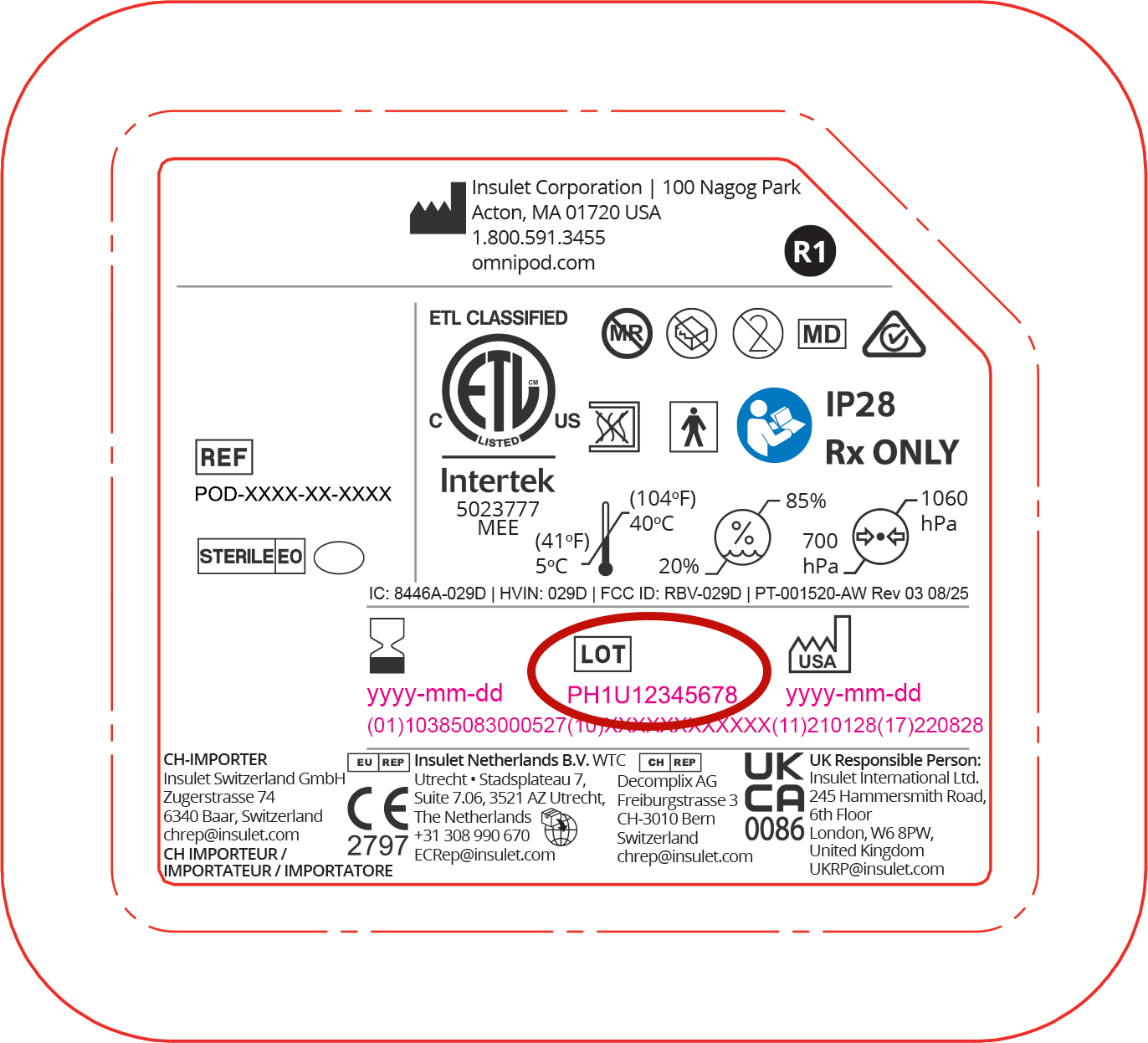
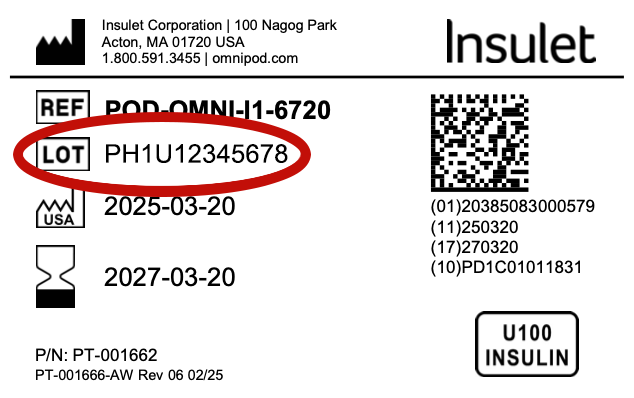
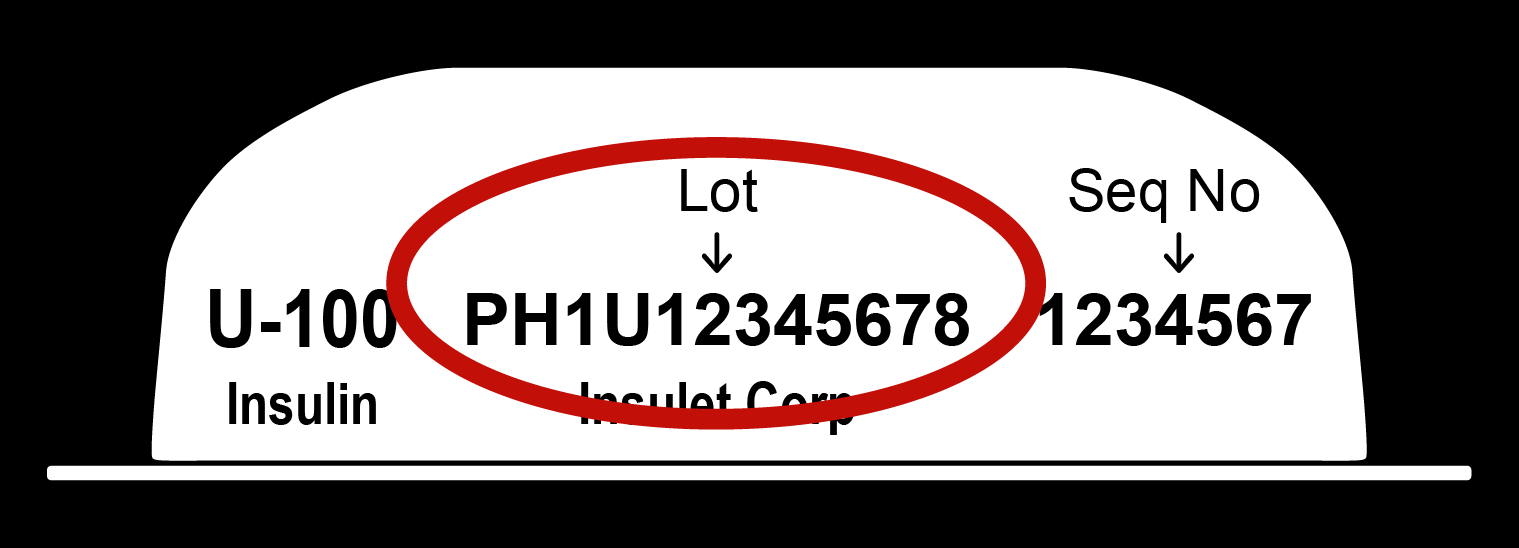
- Check the lot number on your Pod tray lid, the Pod box or the Pod itself to determine if your Pods are affected.
- Provided in Appendix A are instructions and pictures to help you identify the lot number for your Pods
- Review the lot list in Appendix B to determine whether your Pod is impacted. DO NOT use Pods from the affected lots.
- All Pods within a single box will be from a single lot and if the lot is affected, do not use any of those Pods.
- If your Pods are impacted:
- Discontinue use of any impacted Pod immediately. If the Pod you are currently using is from an affected lot, it is important that you immediately change your Pod to resume insulin delivery. When changing your Pod, confirm that the new Pod is not from an affected lot.
- Find the email with subject “ACTION REQUIRED: Review and Acknowledge Recall for Omnipod Pods” and click “Acknowledge & Check Lots” to acknowledge that your Pod is impacted and request a replacement.
- If your Pods are not impacted:
- Find the email with subject “ACTION REQUIRED: Review and Acknowledge Recall for Omnipod Pods” and click “Acknowledge & Check Lots” to acknowledge that your Pods are not impacted.
- For additional support, please call our dedicated Product Support phone line at 1800 954 074, available 24/7.
You will receive a return kit with clear instructions on how to send back any unused affected Pods.
Always check the expiration date before using a Pod. Do not use any Pod that is past its expiration date, as expired Pods may not function as intended.
If your Pod supply is depleted due to this problem, you should consult with your healthcare provider for alternative means of insulin delivery while waiting for Pods to be replaced. Always follow your healthcare provider's guidance on appropriate glucose monitoring.
What this means for users:
We know how important it is to stay on therapy without interruption, and we understand how much you depend on your Omnipod every day to manage your diabetes with confidence.
Your safety and continuity of care are our highest priorities, and we are committed to helping you navigate this situation with minimal disruption. Our team is here to support you every step of the way, with clear guidance, responsive assistance, and a continued focus on your safety and well-being.
We have sufficient supply available to replace affected Pods and do not anticipate any disruption to product availability.
Additional information:
For additional support, please visit the Frequently Asked Questions or call 1800 954 074, available 24/7.
Thank you for taking the time to review this important information and for the trust you place in Omnipod.
Sincerely,

Chuck Medovich
Senior Vice President, Quality Assurance, Regulatory Affairs, and Compliance
Insulet Corporation
Appendix A
The lot number can be located on the Pod tray lid, the 10 pack Pod box, and the flat side of the Pod.
Pod lot number location on the Pod tray lid (circled below in red):
Pod lot number location on the side of the 10-pack Pod box (note all Pods in the same box will have the same Pod lot number): 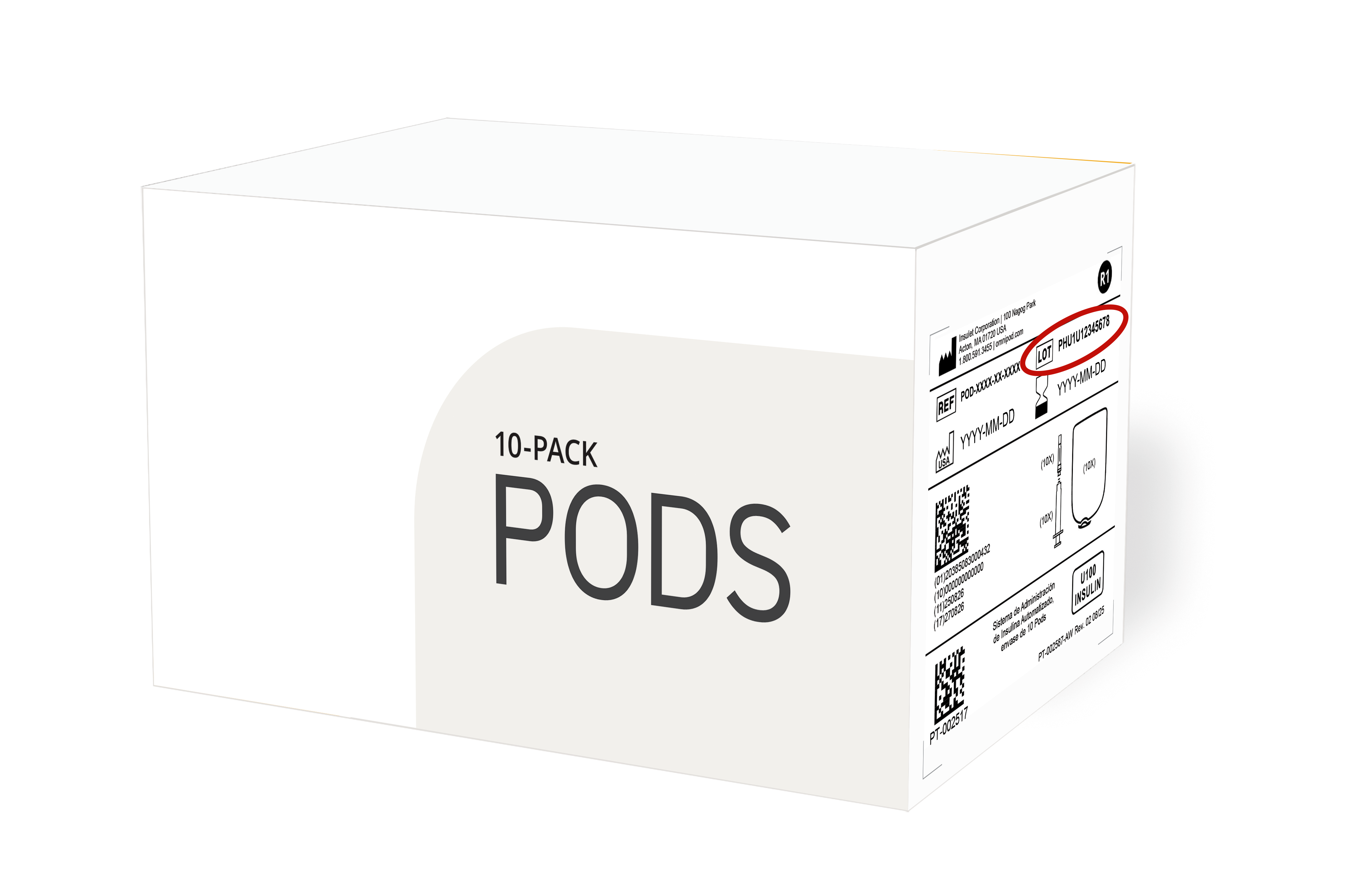
Pod lot number location on the Pod itself (flat side):
Appendix B
| Omnipod DASH |
| PD1U09042421 PD1U11122421 PD1U11202421 |
| Omnipod 5 |
| PH1U10212421 |
Frequently Asked Questions
Why did Insulet issue a Recall for Omnipod® 5 and Omnipod DASH Pods?
Is this different from the action in March?
What could happen if a Pod from an affected lot is used?
Have regulators been notified?
How do I know if my Pods are affected?
What if I already used an affected Pod?
Who can I call if I have any questions?
How is Insulet communicating this issue to customers?
Has anyone been hurt due to this issue with Omnipod Pods?
Will Insulet continue to ship Pods and how are you confident in doing so?
What steps is the company taking to correct the problem and ensure it doesn’t happen again?
I received the notice of voluntary Recall. Do I have to do anything?
I believe I may have Pods that are impacted by this problem. How do I get replacements?
How do I find the Lot number?
How long will it take to receive replacement Omnipod 5, Omnipod DASH, and Omnipod (Eros) Pods?
One of my Pods is part of the affected lots. Is it safe to use another Pod from the same box?
What do I do if all my Pods are affected?
What if none of my Pods are included in the affected lots? Is it safe to continue using unaffected Pods?
Do I need to return affected Pods? How do I do that?
If I get an alarm, does this mean I have a faulty Pod and need a replacement?
Is Insulet paying for the return of my Pods?
If I have Pods that are affected, will Insulet exchange them for new unaffected Pods?