Insulin pumps and CGMs: how these technologies work together

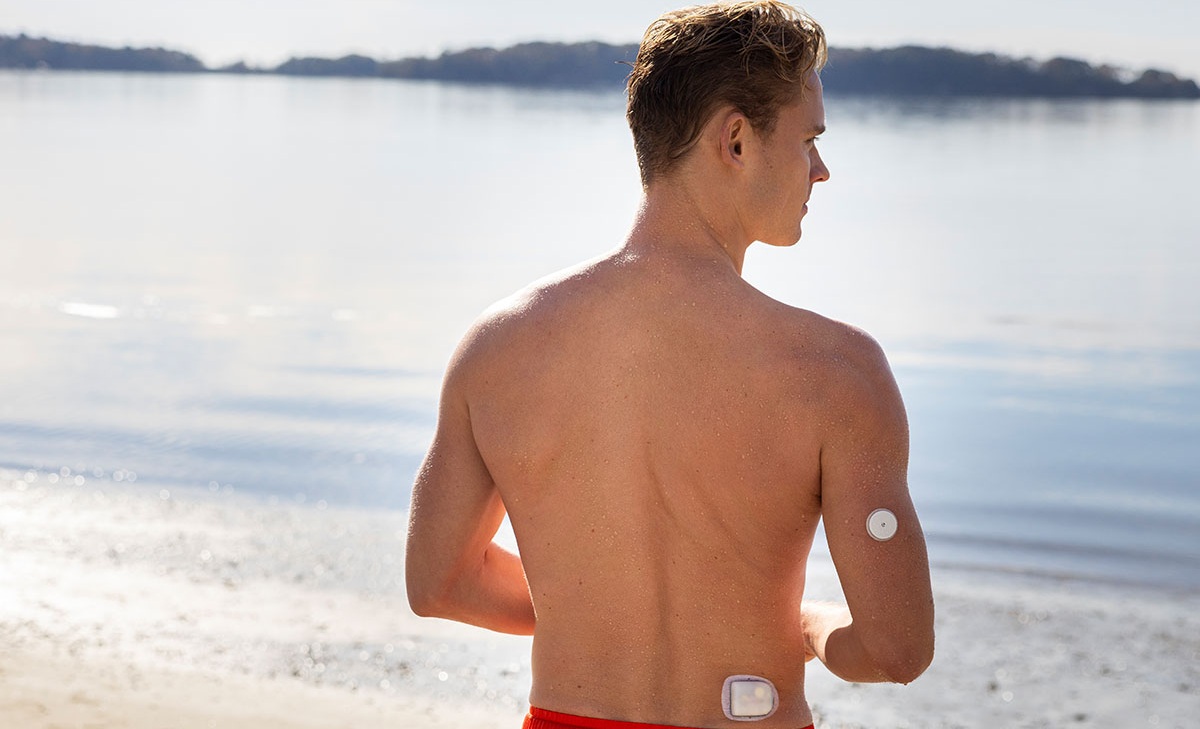
Managing type 1 diabetes means making numerous decisions every day about insulin, food, and glucose levels. Insulin pumps and continuous glucose monitors (CGMs or ‘sensors’) each reduce that burden on their own. When combined, as in an automated insulin delivery system, they can function together to monitor your glucose and adjust your insulin automatically. This guide explains how the two technologies work as a pair, from choosing compatible devices to practical tips for living with both on your body.
What does it mean to use an insulin pump and CGM together?
An insulin pump is a wearable device that delivers insulin continuously, day and night. It provides a steady background rate of insulin (called basal insulin) and lets you deliver additional doses for meals or to correct high glucose.
A continuous glucose monitor (CGM) is a sensor-based device that measures glucose in interstitial fluid (the fluid between cells in the tissue just beneath your skin). Most CGM systems take readings approximately every five minutes, display real-time glucose values and trend arrows on a compatible smartphone/receiver/device, and alert you when your glucose goes too high or too low.
When you use a pump and a CGM, you are getting the benefit of continuous insulin delivery, and the benefit of a continuous stream of glucose data. Hybrid closed loop systems take this to the next level, where the two devices communicate directly: the pump, with its algorithm, will automatically adjust insulin based on the CGM value and trend.
CGM and insulin pumps work together in a variety of ways
Not every CGM + pump setup works the same way. They can work together in a variety of ways including:
Standalone use
Each device (an insulin pump and a CGM) can be worn alone, or they can be worn together but are not communicating. Your pump delivers insulin based on programmed settings; your CGM shows you glucose readings and trends on your phone or receiver. You still make all dosing decisions yourself, but you can use your CGM readings to decide when and how much to bolus.
Hybrid closed loop systems
Hybrid closed loop systems consist of three parts that communicate, an insulin pump, a compatible CGM/sensor and an algorithm. The sensor shares glucose readings with the pump throughout the day and night, and the algorithm adjusts how much insulin the pump delivers based on those readings. You still need to bolus for meals, but background management runs around the clock. Omnipod® 5 is one example of an HCL system, using sensor glucose data to automatically adjust basal insulin delivery.
Where do most people start?
Choosing which device to start with is an individual choice. Standalone use can be a starting point as it gives people time to get comfortable with each device before adding automation, however more and more we are seeing people going directly to a HCL system - so speak to your healthcare team about the best place to start for you.
CGM and insulin pump compatibility
Understanding how compatibility works and how it can change helps you ask the right questions before you commit to a device.
Can I use any CGM/sensor with any insulin pump?
No. CGM and insulin pump compatibility are device specific. Not every CGM can communicate with every pump, so it's important as you research your options to consider which devices communicate and are compatible.
Does CGM and insulin pump compatibility ever change?
Yes. As manufacturers receive new regulatory clearances, compatible options can expand over time. A pump that works with one sensor today may add compatibility for more sensors through future updates, and new approved sensor devices. Always check current compatibility documentation on your pump manufacturer’s website and confirm with your healthcare provider before making a purchasing decision based on any static list.
Connectivity and reliability of devices
For an HCL system to do its job, the CGM and pump need to stay in communication.
How reliable is the wireless connection between a pump and CGM?
Modern HCL systems use Bluetooth to communicate between sensor and pump. In everyday use, connectivity is generally reliable, and most people manage full days, workdays, and nights without interruptions. Like any wireless system, signal can occasionally drop if devices are too far apart or if there’s interference. Most people find connectivity to be a non-issue in practice but knowing what to expect and what to do if there is a break in communication is important.
What to do if your CGM/sensot loses connection
If your sensor temporarily loses its connection to the pump, most HCL systems enter a safe fallback mode: they continue delivering a baseline rate of insulin rather than stopping entirely, and they alert you to the signal loss. During the gap, you can still deliver a manual bolus. If you have symptoms that don’t match what your CGM was last showing, use a fingerstick to confirm your glucose level.† Once the CGM reconnects, automated adjustments resume automatically.
Battery life, wear schedules, and keeping your system running
Managing two devices means tracking two different replacement schedules, two charging routines, and a steady supply of consumables. Getting a handle on each one early makes the day-to-day experience significantly smoother.
How long do CGM/sensors and insulin pumps last?
Wear schedules vary by device, but here’s the general picture:
- Most sensors last anywhere from 10 to 15 days depending on the brand and model.
- Insulin pump infusion sets and reservoirs generally need to be changed every few days.
You’ll replace your pump components and swap your sensor on different schedules, which is completely normal. Rotating placement sites for both devices over time can help with adhesion and skin comfort.
Charging and battery management
Power requirements vary by device. Tubed insulin pumps may run on disposable batteries or a rechargeable internal battery. Tubeless systems typically include a separate Controller that charges via cable, or they can run through a compatible smartphone app. CGM transmitters also vary: some are rechargeable, some are disposable, and some are built directly into the sensor with no separate charging step.
Plugging in your Controller or phone overnight, the same way you charge other devices, keeps battery disruptions to a minimum. Check your specific device’s documentation for recommended charging intervals.
Tips for wearing an insulin pump and CGM
Wearing two devices takes some getting used to. Most people settle into a routine within a few weeks, and for many, the benefits of better glucose management far outweigh the adjustment period.
Can you shower, swim, and exercise with these devices?
Water resistance varies by device, so it’s worth checking the user guide for both your pump and your sensor before swimming or bathing. Many tubed insulin pumps can be temporarily disconnected for water activities; check your pump’s waterproofing rating to know what’s safe.
The Omnipod 5, for example, carries an IP28 waterproof rating for up to 25 feet for 60 minutes§ and can be worn during showering, swimming, and other water activities. (The Omnipod 5 Controller is not waterproof.)
Tips for sleeping with an insulin pump and CGM
Many people wear both devices comfortably throughout the night. A few things that help:
- Choose sensor and infusion site placements that don’t press uncomfortably against the bed when you sleep on your preferred side.
- Be aware that pressing down on a sensor can occasionally cause inaccurate readings at night. This is known as a “compression low.” If you get an unexpected low alert, check your glucose levels before treating.
- Keep your phone on the nightstand within Bluetooth range so alerts reach you without the phone being on your body.
How to best manage adhesion, alarms, and supply routines
Adhesion: Having clean, dry skin before applying either device makes a meaningful difference. Oils, lotions, or moisture under the adhesive are the most common reasons for early peeling. Over-patches (thin adhesive films that go over a sensor or pump infusion site) are also available from various retailers to add an extra layer of security.
Alarms: Most systems let you customise alert thresholds. If alerts are waking you up for glucose values within a safe range, work with your care team to adjust your targets. This is a normal part of dialling in a new system, not a sign that something is wrong.
Supply routines: Both devices require regular restocking, whether that’s sensors, infusion sets, reservoirs, or system-specific components. Reordering before you run out and maintaining back-up supplies are simple habits that keep your system running without gaps.
Is using an insulin pump with a CGM right for you?
Using an insulin pump with a CGM may not be the right fit for everyone at every stage, and the best path depends on your health goals, lifestyle, and what you’re ready to take on. Some questions worth thinking through with your healthcare professional:
- Do you struggle to stay in your target glucose range despite careful management?
- Do you find frequent fingerstick checks time-consuming or inconsistent?
- Are you interested in a system that can adjust insulin automatically based on your CGM readings?
- Are you comfortable wearing two devices on your body and building a routine around supplies?
What does the learning curve look like?
Some people don’t begin with an automated system. Some may start by gaining comfort on one device before adding automation, with each step bringing its own adjustment period for placement, alarms, and supply routines. Your device trainer and care team are the best resources during that window, and manufacturer support lines are there when something isn’t working.
Learn more about Omnipod® 5 and CGM integration
Omnipod 5 is a tubeless, wearable system that keeps the Pod and compatible sensor in continuous communication. The CGM sensor sends glucose values and trends to the Pod to help the system make automated insulin delivery decisions every five minutes. To explore compatibility in detail, visit the Omnipod 5 sensors page. For answers to common questions about setup and daily use, the Omnipod 5 FAQ page is a helpful next step.

Related Articles


Other topics
References and Disclaimers
†Fingersticks required for diabetes treatment decisions if symptoms or expectations do not match readings.
§The Pod has a waterproof IP28 rating for up to 25 feet (7.6 metres) for 60 minutes. The Controller is not waterproof.
The information provided is not intended as a substitute for professional medical advice. Individual symptoms, situations, and circumstances may vary. Please consult your Healthcare Professional regarding your condition and appropriate medical treatment.
The Omnipod 5 Automated Insulin Delivery System is a single hormone insulin delivery system intended to deliver U-100 insulin subcutaneously for the management of type 1 diabetes in persons aged 2 and older requiring insulin.
The Omnipod 5 System is intended to operate as an automated insulin delivery system when used with compatible Continuous Glucose Monitors (CGM). When in automated mode, the Omnipod 5 system is designed to assist people with type 1 diabetes in achieving glycaemic targets set by their healthcare providers. It is intended to modulate (increase, decrease or pause) insulin delivery to operate within predefined threshold values using current and predicted CGM values to maintain blood glucose at variable target glucose levels, thereby reducing glucose variability. This reduction in variability is intended to lead to a reduction in the frequency, severity, and duration of both hyperglycaemia and hypoglycaemia.
The Omnipod 5 System can also operate in a manual mode that delivers insulin at set or manually adjusted rates.
Warning: DO NOT start to use the Omnipod® 5 System or change settings without adequate training and guidance from a healthcare provider. Initiating and adjusting settings incorrectly can result in over-delivery or under-delivery of insulin, which could lead to hypoglycaemia or hyperglycaemia.