Back to school with Omnipod®
Download our Caregiver Guide
When your child has diabetes, getting their care team at school up to speed on their management plan can be an important part of your back-to-school checklist.
Whether it’s a school nurse, teacher, or other school support, our Caregiver Guide covers the basics to help them become an Omnipod pro.
Show your school-care team how the Omnipod 5 Controller works, virtually!
Take your teachers for a test drive with the Omnipod® 5 Simulator App.
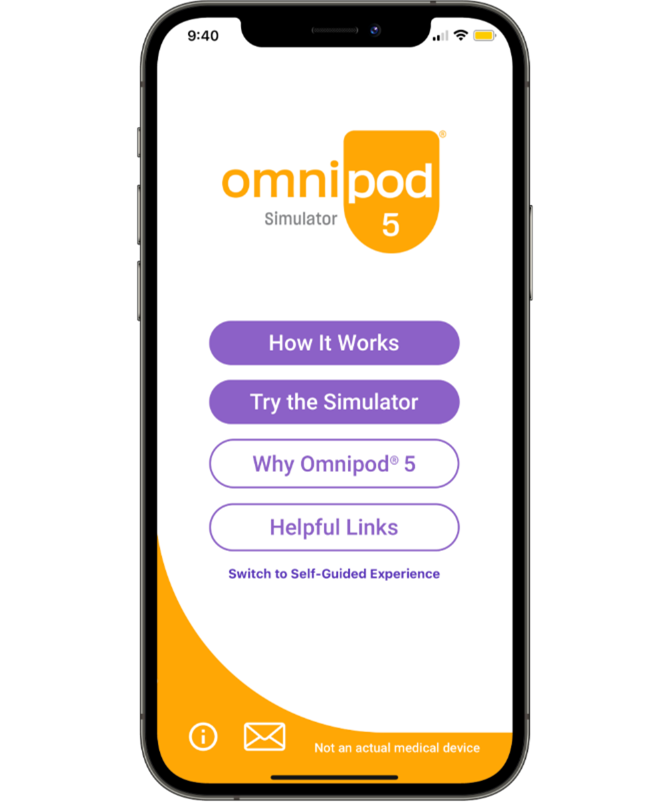
Try the Omnipod 5 Simulator
Access the Omnipod 5 Simulator on your smartphone/tablet/computer and test drive the interactive screens in more detail. The Omnipod® 5 Simulator is an educational and training simulation of the Omnipod 5 Automated Insulin Delivery System. This app is for informational and educational purposes only. It should not be used for therapy decisions. The functions in this app are limited in scope and cannot fully depict the Omnipod 5 System's capabilities. All data is for simulation purposes only. This app does not control the Omnipod 5 System, does not delivery insulin and cannot be used for treatment.
How to Videos
Share these videos with your care partners to learn the basics and frequently asked questions about T1 Diabetes devices and the Omnipod® 5 and Omnipod DASH® System.
More Resources
From our Partners:
Diabetes Australia: Diabetes in Schools
Breakthrough T1D: Back to school with type 1 diabetes
Need support?
Troubleshooting Support & General Materials
Always follow your Healthcare Professional’s recommendations on how to manage your child’s Diabetes, including how to best manage sick days, hypoglycaemia, and emergency situations. If you have any questions about your child’s device and troubleshooting, please contact our Product Support Team.
Our 24hour technical support team is available on 1800 954 074 for any product and technical questions.

Related Articles


Other topics
References and Disclaimers
Important Safety Information: Omnipod® 5 System
The Omnipod 5 System is indicated for use by individuals with type 1 diabetes mellitus in persons 2 years of age and older. The Omnipod 5 System is intended for single patient, home use and requires the supervision of a healthcare professional. The Omnipod 5 System is compatible with the following U-100 insulins:
Novolog®/Novorapid, Humalog®, and Admelog®/Insulin lispro Sanofi®. The Omnipod 5 Pump (Pod) is intended for the subcutaneous delivery of insulin, at set and variable rates, for the management of diabetes mellitus in persons requiring insulin. The Omnipod 5 Pump is able to reliably and securely communicate with compatible, digitally connected devices, including automated insulin dosing software, to receive, execute, and confirm commands from these devices. SmartAdjust™ technology is intended for use with compatible integrated continuous glucose monitors (iCGM) to automatically increase, decrease, and pause delivery of insulin based on current and predicted glucose values. The Omnipod 5 SmartBolus Calculator is intended to calculate a suggested bolus dose based on user-entered carbohydrates, most recent sensor glucose value (or blood glucose reading if using fingerstick), rate of change of the sensor glucose (if applicable), insulin on board (IOB), and programmable correction factor, insulin to carbohydrate ratio, and target glucose value. Warning: SmartAdjust technology should NOT be used by anyone under the age of 2 years old. SmartAdjust technology should also NOT be used in people who require less than 5 units of insulin per day as the safety of the technology has not been evaluated in this population.
The Omnipod 5 System is NOT recommended for people who are unable to monitor glucose as recommended by their healthcare provider, are unable to maintain contact with their healthcare provider, are unable to use the Omnipod 5 System according to instructions, are taking hydroxyurea as it could lead to falsely elevated CGM values and result in over-delivery of insulin that can lead to severe hypoglycemia, and do NOT have adequate hearing and/or vision to allow recognition of all functions of the Omnipod 5 System, including alerts, alarms, and reminders. Device components including the Pod, CGM transmitter, and CGM sensor must be removed before Magnetic Resonance Imaging (MRI), Computed Tomography (CT) scan, or diathermy treatment. In addition, the Controller and smartphone should be placed outside of the procedure room. Exposure to MRI, CT, or diathermy treatment can damage the components.
Visit www.omnipod.com/safety for additional important safety information.
INS-OHS-01-2026-00130 V1.0