Planning on connecting a different sensor with Omnipod® 5? We’ve got you covered.
If you are planning to connect a different sensor with Omnipod 5, please note the following:
1) Speak to your Healthcare Professional to discuss this change. If agreed, you will:
- Need to request a prescription for the new sensor.
- Request training on how to use the new sensor from your HCP or sensor manufacturer.
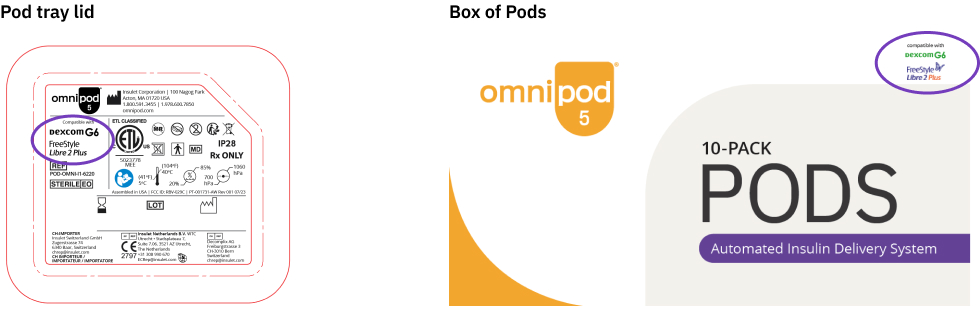
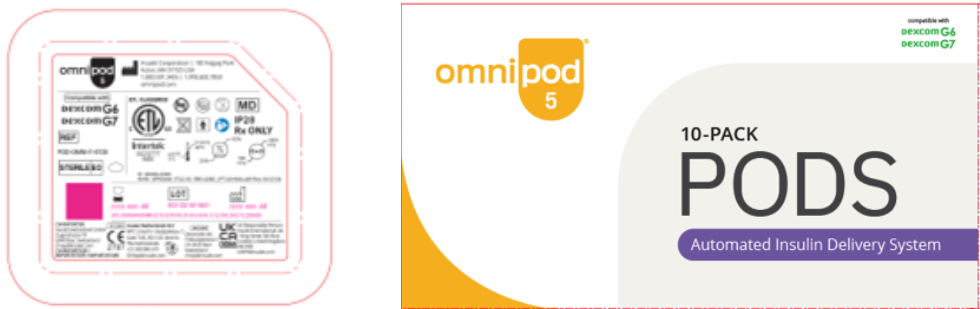
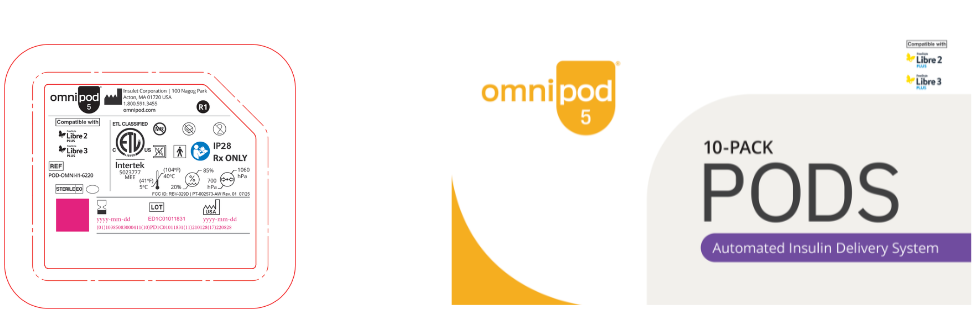
2) Please check the compatibility of your Pods which is highlighted on the Pod Tray lid and in the top right-hand corner of the Box of Pods and (see below).
- Please use your existing Pods and sensors before switching to a new sensor.
- Insulet are now distributing three versions of Pods
- Omnipod 5 Pods compatible with both Dexcom G6 and Dexcom G7 sensors.
- Omnipod 5 Pods compatible with both FreeStyle Libre 2 Plus and Dexcom G6 sensors.
- Omnipod 5 Pods compatible with both FreeStyle Libre 3 Plus and FreeStyle Libre 2 Plus
3) Please review the latest Omnipod 5 guides and videos below to understand how Omnipod 5 connects with each sensor type.
Connection to Sensor: Dexcom G6
Connection to Sensor: Dexcom G7
Connection to Sensor: FreeStyle Libre 2 Plus
Connection to Sensor: FreeStyle Libre 3 Plus
How to Notify Us of a Sensor Change
To ensure uninterrupted access to Pods, your Omnipod® account must match your updated NDSS record.
Contact Omnipod® Customer Operations as soon as your HCP updates your Sensor in the NDSS Portal:
- Call: 1800 954 075 (Option 2) | Monday–Friday, 9am–6pm AEST
- Email: [email protected]
Please include:
- The Sensor you are changing from
- The Sensor you are changing to
Thank you for being part of the Omnipod® community.
We’re here to support you every step of the way.